Livewire 4 vs Inertia vs API+SPA: When to Choose What

The Landscape in 2026
Laravel gives you three distinct paths for building frontends, and the community is more opinionated than ever about which one is "right." The truth is — they all are, depending on context.
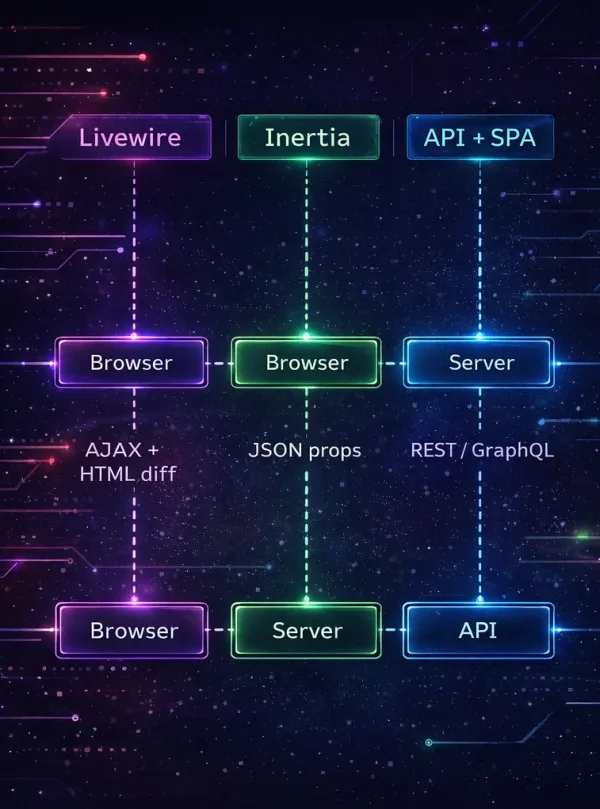
Here's the quick mental model:
- Livewire 4 — Server renders HTML, sends diffs over AJAX. You write PHP and Blade. Alpine.js handles client-side sprinkles.
- Inertia.js — Server handles routing and data, client renders with Vue/React/Svelte. No API layer needed.
- API + SPA — Server exposes a JSON API (Sanctum/Passport), client is a fully independent Vue/React/Next app.
I've shipped production applications with all three. This blog runs on Livewire 4 with Volt. Let me walk you through each approach with real code, then give you a framework for choosing.
Livewire 4 (+ Volt)
How It Works
Livewire components are PHP classes that render Blade views. When a user interacts with the page — clicks a button, types in an input — Livewire sends an AJAX request to the server, re-renders the component, and sends back only the parts of the DOM that changed. No JavaScript framework required.
Livewire 4 paired with Volt takes this further: your PHP logic and Blade template live in a single file. No separate class file, no separate view file.
Real Code: Search with Live Filtering
Here's how this blog's post listing works — a Volt single-file component with live search:
<?php

use App\Models\Post;
use Illuminate\Pagination\LengthAwarePaginator;
use Livewire\Attributes\Computed;
use Livewire\Attributes\Url;
use Livewire\Volt\Component;
use Livewire\WithPagination;

new class extends Component
{
    use WithPagination;

    #[Url]
    public string $search = '';

    #[Url]
    public string $tag = '';

    public function updatedSearch(): void
    {
        $this->resetPage();
    }

    public function updatedTag(): void
    {
        $this->resetPage();
    }

    #[Computed]
    public function posts(): LengthAwarePaginator
    {
        return Post::query()
            ->published()
            ->when($this->search, fn ($q) => $q->search($this->search))
            ->when($this->tag, fn ($q) => $q->withTag($this->tag))
            ->with(['category', 'tags', 'media'])
            ->latest('published_at')
            ->paginate(12);
    }
}; ?>

<div>
    <input
        type="text"
        wire:model.live.debounce.300ms="search"
        placeholder="Search posts..."
    />

    <div>
        @foreach ($this->posts as $post)
            <x-post-card :post="$post" />
        @endforeach
    </div>

    {{ $this->posts->links() }}
</div>
Notice what's happening:
wire:model.live.debounce.300ms— as the user types, the search updates after 300ms of inactivity. No JavaScript event handlers, no fetch calls, no state management.#[Url]— the search term and tag filter are synced to the URL query string. Bookmark a filtered view, share it, hit back — it all works.#[Computed]— the query runs on every render but is cached within the request lifecycle.
What Livewire Is Great For
- Admin panels and dashboards — Filament 5 is built entirely on Livewire. Tables, forms, modals, notifications — all server-rendered.
- CRUD interfaces — forms, lists, filters, pagination. The bread and butter of web apps.
- PHP-first teams — if your team thinks in PHP and Blade, Livewire lets them build reactive UIs without learning React/Vue.
- Content sites and blogs — SEO-friendly by default (server-rendered HTML), fast with Octane.
- Rapid prototyping — one file, one language, instant feedback.
Limitations (Honest Assessment)
- Complex drag-and-drop — possible with Alpine.js + Sortable.js, but fighting the framework. A React DnD library is smoother.
- Offline-first apps — Livewire needs a server connection. No server = no interactivity.
- Heavy real-time collaboration — think Google Docs-style concurrent editing. Livewire's request/response model isn't designed for this.
- Large interactive canvases — drawing tools, map editors, video editors. These need direct DOM manipulation that server round-trips can't match.
Performance Reality with Octane
People worry about Livewire's "chattiness" — every interaction is a server round-trip. In practice, with FrankenPHP and Octane keeping the app in memory, these round-trips take 5-15ms server-side. Add network latency and you're at 30-80ms for most interactions. Users perceive anything under 100ms as instant.
The real performance concern isn't latency — it's payload size. A Livewire component that renders a 500-row table sends a lot of HTML over the wire. Pagination and lazy loading solve this.
Inertia.js
How It Works
Inertia sits between traditional server-rendered apps and SPAs. Your Laravel routes return Inertia responses instead of Blade views. The response contains a JSON payload with the page component name and its props. On the client, Inertia renders the appropriate Vue/React/Svelte component with those props.
The key insight: no API layer. Your controller returns data the same way it would for a Blade view, but Inertia delivers it to a client-side component.
Real Code: The Same Search Feature in Inertia + Vue
Controller:
<?php

namespace App\Http\Controllers;

use App\Models\Post;
use Illuminate\Http\Request;
use Inertia\Inertia;
use Inertia\Response;

class BlogController extends Controller
{
    public function index(Request $request): Response
    {
        return Inertia::render('Blog/Index', [
            'posts' => Post::query()
                ->published()
                ->when(
                    $request->input('search'),
                    fn ($q, $search) => $q->search($search)
                )
                ->when(
                    $request->input('tag'),
                    fn ($q, $tag) => $q->withTag($tag)
                )
                ->with(['category', 'tags', 'media'])
                ->latest('published_at')
                ->paginate(12)
                ->withQueryString(),
            'filters' => $request->only(['search', 'tag']),
        ]);
    }
}
Vue component (resources/js/Pages/Blog/Index.vue):
<script setup>
import { ref, watch } from 'vue'
import { router } from '@inertiajs/vue3'
import { debounce } from 'lodash-es'

const props = defineProps({
    posts: Object,
    filters: Object,
})

const search = ref(props.filters.search ?? '')

watch(search, debounce((value) => {
    router.get('/blog', { search: value }, {
        preserveState: true,
        replace: true,
    })
}, 300))
</script>

<template>
    <div>
        <input
            v-model="search"
            type="text"
            placeholder="Search posts..."
        />

        <div>
            <PostCard
                v-for="post in posts.data"
                :key="post.id"
                :post="post"
            />
        </div>

        <Pagination :links="posts.links" />
    </div>
</template>
The Sweet Spot
Inertia shines when you want:
- SPA-like navigation without building an API — page transitions feel instant because Inertia prefetches and caches.
- Full power of Vue/React — component ecosystem, dev tools, TypeScript, advanced state management.
- Laravel's routing, middleware, and validation — everything stays server-side. No duplicated routing logic.
- Teams with JavaScript skills — frontend devs can write Vue/React while backend devs write controllers. Clear boundary at the Inertia response.
Limitations
- Two mental models — you're writing PHP on the backend and JavaScript on the frontend. Context-switching has a cost, especially for solo developers.
- SSR adds complexity — for SEO, you need Inertia SSR which runs a Node.js process alongside your PHP app. One more thing to deploy and monitor.
- Blade components don't work — you're in Vue/React land. That beautiful DaisyUI Blade component library? You'll need to rebuild it in Vue.
- Tighter coupling than API+SPA — your frontend is tied to Inertia's conventions. Swapping to a mobile app later means building that API anyway.
API + SPA (Decoupled)
How It Works
The most traditional "modern" architecture: Laravel serves a JSON API (usually with Sanctum for authentication), and a completely separate frontend application (Vue/React/Next/Nuxt) consumes it. Two deployments, two repos (usually), two build pipelines.
Real Code: API Resource + Sanctum Auth
API Resource:
<?php

namespace App\Http\Resources;

use Illuminate\Http\Request;
use Illuminate\Http\Resources\Json\JsonResource;

class PostResource extends JsonResource
{
    public function toArray(Request $request): array
    {
        return [
            'id' => $this->id,
            'title' => $this->getTranslation('title', app()->getLocale()),
            'slug' => $this->slug,
            'excerpt' => $this->getTranslation('excerpt', app()->getLocale()),
            'content' => $this->getTranslation('content', app()->getLocale()),
            'published_at' => $this->published_at?->toIso8601String(),
            'views_count' => $this->views_count,
            'category' => new CategoryResource($this->whenLoaded('category')),
            'tags' => TagResource::collection($this->whenLoaded('tags')),
            'cover_url' => $this->getFirstMediaUrl('cover', 'optimized'),
        ];
    }
}
API Controller:
<?php

namespace App\Http\Controllers\Api\V1;

use App\Http\Controllers\Controller;
use App\Http\Resources\PostResource;
use App\Models\Post;
use Illuminate\Http\Request;
use Illuminate\Http\Resources\Json\AnonymousResourceCollection;

class PostController extends Controller
{
    public function index(Request $request): AnonymousResourceCollection
    {
        $posts = Post::query()
            ->published()
            ->when(
                $request->input('search'),
                fn ($q, $search) => $q->search($search)
            )
            ->with(['category', 'tags', 'media'])
            ->latest('published_at')
            ->paginate(12);

        return PostResource::collection($posts);
    }
}
Routes with Sanctum:
// routes/api.php
Route::prefix('v1')->group(function () {
    Route::get('/posts', [PostController::class, 'index']);
    Route::get('/posts/{post:slug}', [PostController::class, 'show']);

    Route::middleware('auth:sanctum')->group(function () {
        Route::post('/posts', [PostController::class, 'store']);
        Route::put('/posts/{post}', [PostController::class, 'update']);
    });
});
When API+SPA Makes Sense
- Mobile + web sharing the same backend — your React Native app and your web app hit the same API.
- Separate frontend and backend teams — clear contract at the API boundary. Teams can deploy independently.
- Microservices architecture — Laravel is one of many services, each with its own API.
- Third-party integrations — your API is a product that external developers consume.
Limitations
- Double deployment complexity — two CI/CD pipelines, two hosting setups, two sets of environment variables.
- CORS configuration — cross-origin requests need careful setup. Sanctum's SPA authentication uses cookies and requires
SESSION_DOMAIN,SANCTUM_STATEFUL_DOMAINS, and proper CORS headers. - Slower solo developer velocity — you're building two applications. For a one-person team, this is significant overhead.
- API versioning burden — once external consumers depend on your API, breaking changes require versioning and migration paths.
Decision Matrix
Before reaching for what's trendy, ask yourself these questions:
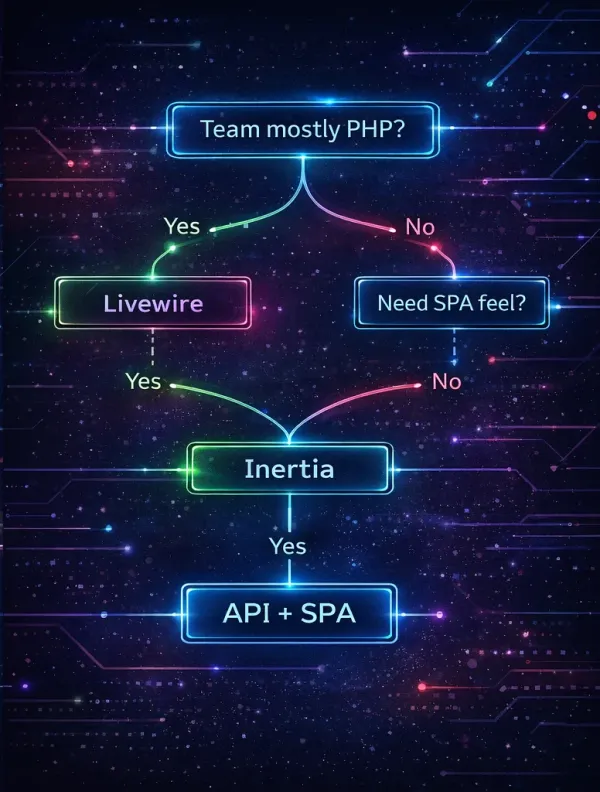
| Factor | Livewire 4 | Inertia.js | API + SPA |
|---|---|---|---|
| Team composition | PHP-first, 1-3 devs | Full-stack or mixed | Separate FE/BE teams |
| Best for | Admin panels, CRUD, blogs, dashboards | SPA-feel apps with Laravel backend | Multi-client (web + mobile), platform APIs |
| Interactivity level | Low to medium | Medium to high | High (offline, real-time) |
| Time to first feature | Fastest | Medium | Slowest |
| SEO | Built-in (server HTML) | Needs SSR (Node process) | Needs SSR (Next/Nuxt) or pre-rendering |
| Offline support | None | Limited | Full (service workers) |
| JavaScript knowledge needed | Minimal (Alpine.js) | Moderate (Vue/React) | Advanced (Vue/React + state management) |
| Deployment complexity | Single app | Single app | Two apps |
| Can reuse for mobile API? | No (separate API needed) | No (separate API needed) | Yes (same API) |
| Component ecosystem | Blade/Livewire (Filament, Flux UI) | Vue/React ecosystem | Vue/React ecosystem |
Hybrid Approaches
The dirty secret: production apps rarely use just one approach. Here are combinations that work well.
Livewire app + Alpine.js islands
This is the default Livewire pattern and it's powerful. Livewire handles data and server interactions, Alpine.js handles client-side UI state:
<div x-data="{ open: false }">
    <button @click="open = !open">Toggle details</button>

    <div x-show="open" x-transition>
        {{-- This content toggles without a server round-trip --}}
        <p>{{ $post->excerpt }}</p>
    </div>

    {{-- This button triggers a Livewire server action --}}
    <button wire:click="publish">Publish</button>
</div>
Alpine handles the toggle (instant, no server), Livewire handles the publish action (needs server validation and database write). Best of both worlds.
Livewire app + one Vue widget
Sometimes you need one highly interactive widget in an otherwise Livewire app — a chart, a drag-and-drop builder, a rich text editor. You can mount a Vue component inside a Blade view:
{{-- In your Blade/Livewire view --}}
<div id="analytics-chart"></div>

@push('scripts')
<script type="module">
    import { createApp } from 'vue'
    import AnalyticsChart from './components/AnalyticsChart.vue'

    createApp(AnalyticsChart, {
        data: @json($chartData),
        period: '{{ $period }}'
    }).mount('#analytics-chart')
</script>
@endpush
This works because Vite bundles your Vue component, and Blade simply mounts it. The Vue component is an island of interactivity — it doesn't need Inertia or a full SPA setup.
Inertia frontend + Livewire admin panel
This is surprisingly common. Your public-facing app uses Inertia + Vue for a polished SPA experience, while your admin panel uses Filament (which is built on Livewire). They coexist in the same Laravel app:
// routes/web.php — Inertia pages
Route::get('/', fn () => Inertia::render('Home'));
Route::get('/blog', [BlogController::class, 'index']);
Route::get('/blog/{post:slug}', [BlogController::class, 'show']);

// Filament admin panel registers its own routes automatically
// at /admin (configured in LairPanelProvider)
No conflict. Inertia handles public routes, Filament handles admin routes. Different rendering engines, same Laravel backend.
What I Use and Why
This blog runs on Livewire 4 with Volt for the public site and Filament 5 for the admin panel. Both are Livewire under the hood. Here's my reasoning:
I'm a solo developer. I maintain the backend, the frontend, the deployment pipeline, and the content. Every additional technology I introduce is a context switch that slows me down. With Livewire, I think in PHP from database to browser.
The blog's interactivity is moderate. Search with filtering, theme switching, pagination, view counting — all well within Livewire's sweet spot. I don't need drag-and-drop, real-time collaboration, or offline support.
Volt single-file components are a game-changer. One file per page. PHP logic at the top, Blade template at the bottom. Open a file, see everything. No jumping between a component class and a view file.
Filament is incredible for admin panels. Writing a custom admin from scratch in 2026 is unnecessary unless you have very specific requirements. Filament gives you tables, forms, dashboards, and widgets — all with Livewire reactivity, all customizable.
Performance is excellent with Octane. FrankenPHP keeps the app in memory. Livewire round-trips take 5-15ms server-side. The blog loads fast, ranks well, and costs $3.49/month to host.
When I'd choose differently
- Dedicated frontend developer on the team — I'd use Inertia + Vue. Let them build beautiful components while I focus on the backend.
- Mobile app sharing the same backend — API + SPA. The API investment pays off across multiple clients.
- Highly interactive product (Figma, Notion, Linear clone) — React SPA with a Laravel API. Some UIs need direct DOM control that no server-rendered approach can match.
The Bottom Line
There's no wrong choice — only mismatched choices. A solo PHP developer building a SPA with React is leaving productivity on the table. A team of React experts forced to write Blade templates is equally mismatched.
Pick the approach that matches your team, your project's interactivity needs, and your deployment constraints. Then commit to it. The worst outcome isn't choosing the "wrong" framework — it's spending six months debating instead of shipping.
Have a different take? Let me know on GitHub, LinkedIn, or X.