Redis Patterns in Laravel You're Not Using (But Should Be)

Introduction
Most Laravel developers use Redis the same way: Cache::get(), Cache::put(), maybe Cache::remember() if they're feeling fancy. That covers 80% of use cases, and honestly, it's fine.
But Redis isn't just a key-value cache. It's a data structure server — it supports sorted sets, lists, sets, hashes, streams, pub/sub channels, and atomic operations via Lua scripting. Laravel gives you clean access to all of these through the Redis facade and the Cache abstraction, but most of the power goes unused.
In this article, I'll walk through seven Redis patterns I use in production. Each one solves a real problem that Cache::get() can't. I'll show the actual code, explain when to reach for each pattern, and flag the gotchas that bit me.
1. Buffered Counters
The most common mistake I see: writing directly to the database on every page view, every click, every event. Your PostgreSQL database can handle it — until it can't. Each UPDATE posts SET views_count = views_count + 1 takes a lock, writes a WAL entry, and triggers any observers or event listeners you've attached.
The solution is simple: buffer writes in Redis, flush to the database periodically.
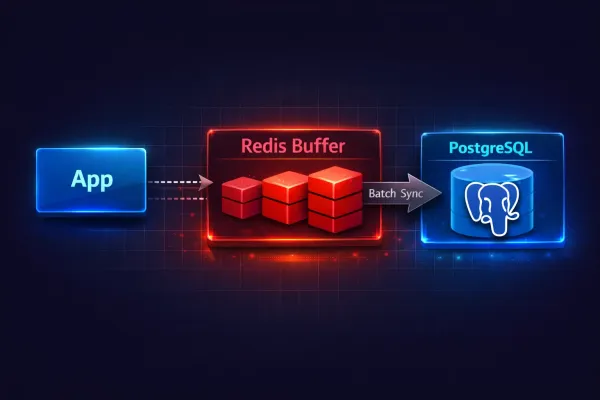
This is exactly how the view counter on this blog works. Here's the action that increments a post's view count:
<?php

namespace App\Actions\Posts;

use Illuminate\Support\Facades\Redis;
use Lorisleiva\Actions\Concerns\AsAction;

class IncrementPostView
{
    use AsAction;

    private const REDIS_KEY_PREFIX = 'post_views:';
    private const REDIS_VIEWS_SET = 'post_views:pending';
    private const UNIQUE_VIEW_TTL = 3600; // 1 hour

    public function handle(int $postId, ?string $visitorIp = null): void
    {
        if ($visitorIp && $this->hasRecentView($postId, $visitorIp)) {
            return;
        }

        Redis::pipeline(function ($pipe) use ($postId, $visitorIp) {
            $pipe->incr(self::REDIS_KEY_PREFIX . $postId);
            $pipe->sadd(self::REDIS_VIEWS_SET, $postId);

            if ($visitorIp) {
                $pipe->setex(
                    $this->uniqueKey($postId, $visitorIp),
                    self::UNIQUE_VIEW_TTL,
                    1
                );
            }
        });
    }

    private function hasRecentView(int $postId, string $visitorIp): bool
    {
        return (bool) Redis::exists($this->uniqueKey($postId, $visitorIp));
    }

    private function uniqueKey(int $postId, string $visitorIp): string
    {
        return "post_view_unique:{$postId}:" . md5($visitorIp);
    }
}
Three things happen atomically inside a pipeline:
INCRbumps the counter for this post. RedisINCRis atomic and lock-free — it handles millions of increments per second.SADDadds the post ID to a pending set, so the sync job knows which posts have new views.SETEXmarks this IP as "already viewed" with a 1-hour TTL, preventing duplicate counting.
The sync job runs every 5 minutes via the scheduler:
<?php

namespace App\Actions\Posts;

use App\Models\Post;
use Illuminate\Console\Command;
use Illuminate\Support\Facades\Redis;
use Lorisleiva\Actions\Concerns\AsAction;

class SyncPostViewsToDatabase
{
    use AsAction;

    public string $commandSignature = 'posts:sync-views';
    public string $commandDescription = 'Sync post view counts from Redis to database';

    private const REDIS_KEY_PREFIX = 'post_views:';
    private const REDIS_VIEWS_SET = 'post_views:pending';

    public function handle(): int
    {
        $postIds = Redis::smembers(self::REDIS_VIEWS_SET);

        if (empty($postIds)) {
            return 0;
        }

        $synced = 0;

        foreach ($postIds as $postId) {
            $views = (int) Redis::getdel(self::REDIS_KEY_PREFIX . $postId);

            if ($views > 0) {
                Post::withoutTimestamps(
                    fn () => Post::where('id', $postId)
                        ->increment('views_count', $views)
                );
                $synced++;
            }

            Redis::srem(self::REDIS_VIEWS_SET, $postId);
        }

        return $synced;
    }

    public function asCommand(Command $command): void
    {
        $synced = $this->handle();
        $command->info("Synced view counts for {$synced} posts.");
    }
}
Register it in routes/console.php:
use App\Actions\Posts\SyncPostViewsToDatabase;

Schedule::job(SyncPostViewsToDatabase::class)->everyFiveMinutes();
Reading the count combines both sources — database (persisted) plus Redis (buffered):
public function handle(int|Post $post): int
{
    $postId = $post instanceof Post ? $post->id : $post;
    $dbCount = $post instanceof Post
        ? $post->views_count
        : (Post::where('id', $postId)->value('views_count') ?? 0);

    $redisCount = (int) Redis::get('post_views:' . $postId);

    return $dbCount + $redisCount;
}
Why this beats direct DB writes
- 100 views/second = 100 DB writes/second vs. 100 Redis increments + 1 DB write every 5 minutes
- No row-level locks competing with your read queries
- If Redis goes down, you lose at most 5 minutes of counts — not your database stability
Post::withoutTimestamps()prevents the sync from updatingupdated_at, which would bust caches and trigger observers unnecessarily
When NOT to use this
Don't buffer if you need exact real-time counts for business logic (e.g., inventory, auction bids). Use INCR + read-through for those — still Redis, but without the delayed sync.
2. Distributed Locks
Race conditions are the bugs that work fine on your machine and explode in production when two requests hit the same endpoint simultaneously. Laravel's Cache::lock() uses Redis SET NX EX under the hood — an atomic "set if not exists with expiry" operation.
Preventing duplicate payment processing
use Illuminate\Support\Facades\Cache;

class ProcessPayment
{
    use AsAction;

    public function handle(Order $order): PaymentResult
    {
        $lock = Cache::lock("payment:{$order->id}", ttl: 30);

        if (! $lock->get()) {
            throw new PaymentInProgressException(
                "Payment for order {$order->id} is already being processed."
            );
        }

        try {
            // Charge the customer — safe from double processing
            $result = $this->chargeGateway($order);
            $order->update(['status' => 'paid']);

            return $result;
        } finally {
            $lock->release();
        }
    }
}
Safe cron execution
If your scheduler runs on multiple servers (or a container restarts mid-execution), you can get overlapping jobs. Laravel's withoutOverlapping() uses Redis locks internally, but you can also do it manually:
Schedule::job(SyncPostViewsToDatabase::class)
    ->everyFiveMinutes()
    ->withoutOverlapping(expiresAt: 10); // Lock expires after 10 minutes
For custom lock logic inside an action:
public function handle(): void
{
    $lock = Cache::lock('daily-report-generation', ttl: 300);

    $lock->block(10, function () {
        // Wait up to 10 seconds to acquire the lock, then run
        $this->generateReport();
    });
}
Gotchas
- TTL too short: If your operation takes longer than the lock TTL, the lock expires and another process grabs it. Set TTL to at least 2x your expected execution time.
- Owner token lost:
Cache::lock()returns aLockinstance with an owner token. If you serialize/deserialize it (e.g., across a queue), the token is lost andrelease()won't work. UseCache::restoreLock('key', $ownerToken)in those cases. - Forgetting
finally: Always release in afinallyblock. If your code throws beforerelease(), the lock hangs until TTL expires.
3. Sliding Window Rate Limiting
Laravel's built-in RateLimiter uses a fixed window — it resets at hard boundaries (e.g., every minute at :00). This means a user can make 60 requests at 12:00:59 and another 60 at 12:01:00 — 120 requests in 2 seconds.
A sliding window with sorted sets fixes this:
use Illuminate\Support\Facades\Redis;

class SlidingWindowRateLimiter
{
    use AsAction;

    public function handle(
        string $key,
        int $maxAttempts,
        int $windowSeconds
    ): bool {
        $now = microtime(true);
        $windowStart = $now - $windowSeconds;

        $result = Redis::pipeline(function ($pipe) use ($key, $now, $windowStart, $windowSeconds) {
            // Remove entries outside the window
            $pipe->zremrangebyscore($key, '-inf', $windowStart);
            // Add current request
            $pipe->zadd($key, $now, $now . ':' . mt_rand());
            // Count entries in window
            $pipe->zcard($key);
            // Set TTL so the key auto-cleans
            $pipe->expire($key, $windowSeconds);
        });

        $count = $result[2]; // zcard result

        return $count <= $maxAttempts;
    }
}
Per-user API quotas with tiered plans
class ApiRateLimitMiddleware
{
    public function handle(Request $request, Closure $next): Response
    {
        $user = $request->user();
        $key = "api_rate:{$user->id}";

        $limits = match ($user->plan) {
            'free'       => ['max' => 100,  'window' => 3600],
            'pro'        => ['max' => 1000, 'window' => 3600],
            'enterprise' => ['max' => 10000, 'window' => 3600],
        };

        $allowed = SlidingWindowRateLimiter::run(
            $key,
            $limits['max'],
            $limits['window']
        );

        if (! $allowed) {
            return response()->json([
                'error' => 'Rate limit exceeded',
                'retry_after' => $limits['window'],
            ], 429);
        }

        return $next($request);
    }
}
When to use this over built-in RateLimiter
- You need precise per-second/per-minute accuracy without burst exploits
- You have tiered rate limits that change per user
- You need to query "how many requests remain" —
ZCARDgives you the exact count
When the built-in RateLimiter is fine
- Login throttling, password reset throttling — fixed windows are good enough
- You don't care about burst behavior at window boundaries
4. Redis as a Lightweight Queue
Sometimes you need a simple task pipeline without the overhead of Laravel's full queue system — no failed_jobs table, no retry logic, no middleware chain. Redis lists with LPUSH/BRPOP give you a dead-simple FIFO queue:
// Producer: push events for async processing
Redis::lpush('webhook:events', json_encode([
    'type' => 'post.published',
    'post_id' => $post->id,
    'timestamp' => now()->toIso8601String(),
]));
// Consumer: simple artisan command
class ProcessWebhookEvents extends Command
{
    protected $signature = 'webhooks:process';

    public function handle(): void
    {
        $this->info('Waiting for webhook events...');

        while (true) {
            // Block for up to 5 seconds waiting for an item
            $result = Redis::brpop('webhook:events', 5);

            if ($result) {
                [$key, $payload] = $result;
                $event = json_decode($payload, true);
                $this->processEvent($event);
            }
        }
    }
}
When to use Redis lists vs Laravel queues
| Scenario | Redis List | Laravel Queue |
|---|---|---|
| Simple fire-and-forget events | Good | Overkill |
| Need retries, backoff, failure tracking | No | Yes |
| Cross-service communication | Good | Possible but heavier |
| Job middleware, rate limiting, batching | No | Built-in |
| Ultra-low latency (<1ms push) | Yes | ~5ms overhead |
Use Laravel queues for anything that needs reliability. Use Redis lists for lightweight internal pipelines where losing an occasional message is acceptable.
5. Pub/Sub for Cache Invalidation
When running Laravel Octane with FrankenPHP, your application lives in long-running worker processes. Each worker has its own in-memory state. If you cache something in a static property or use an in-memory cache driver, other workers won't see the update.
Redis pub/sub solves cross-worker cache invalidation:
// Publish: when a post is updated
class PostObserver
{
    public function updated(Post $post): void
    {
        Redis::publish('cache:invalidate', json_encode([
            'type' => 'post',
            'id' => $post->id,
            'tags' => ["post:{$post->id}", "category:{$post->category_id}"],
        ]));
    }
}
// Subscribe: artisan command running as a daemon
class CacheInvalidationSubscriber extends Command
{
    protected $signature = 'cache:subscribe';

    public function handle(): void
    {
        Redis::subscribe(['cache:invalidate'], function (string $message) {
            $data = json_decode($message, true);

            foreach ($data['tags'] as $tag) {
                Cache::tags([$tag])->flush();
            }

            $this->info("Invalidated cache for {$data['type']}:{$data['id']}");
        });
    }
}
How this works with Octane workers
Each Octane worker boots independently. The subscriber command runs as a separate process (not inside a worker). When it receives a message, it flushes the relevant Redis cache tags — and since all workers read from the same Redis instance, the stale cache is gone for everyone.
Caveats
- Pub/sub is fire-and-forget — if your subscriber is down when a message is published, the message is lost. For critical invalidation, write to a Redis stream instead (
XADD/XREAD) which persists messages. - Don't subscribe inside Octane workers —
Redis::subscribe()blocks forever. Run it as a separate artisan daemon. - Use a dedicated Redis connection — subscribing blocks the connection. If you use the same connection for caching, everything stalls. Configure a separate connection in
config/database.php.
6. Lua Scripts for Atomic Operations
Individual Redis commands are atomic, but a sequence of commands is not. Between your GET and SET, another process might change the value. Lua scripts run atomically on the Redis server — no other command executes until your script finishes.
Atomic counter with ceiling
Limit a counter to a maximum value (e.g., 100 downloads per file per day):
$script = <<<'LUA'
    local current = tonumber(redis.call('GET', KEYS[1]) or 0)
    local max = tonumber(ARGV[1])
    if current < max then
        redis.call('INCR', KEYS[1])
        return 1
    end
    return 0
LUA;

$allowed = Redis::eval(
    $script,
    1,                          // number of KEYS
    "downloads:{$fileId}:daily", // KEYS[1]
    100                          // ARGV[1] — ceiling
);

if ($allowed) {
    return $this->streamDownload($fileId);
}

return response()->json(['error' => 'Daily download limit reached'], 429);
Token bucket rate limiter
More sophisticated than sliding window — allows controlled bursts:
$script = <<<'LUA'
    local key = KEYS[1]
    local capacity = tonumber(ARGV[1])
    local rate = tonumber(ARGV[2])
    local now = tonumber(ARGV[3])

    local data = redis.call('HMGET', key, 'tokens', 'last_refill')
    local tokens = tonumber(data[1]) or capacity
    local last_refill = tonumber(data[2]) or now

    local elapsed = now - last_refill
    local refill = math.floor(elapsed * rate)
    tokens = math.min(capacity, tokens + refill)

    if tokens >= 1 then
        tokens = tokens - 1
        redis.call('HMSET', key, 'tokens', tokens, 'last_refill', now)
        redis.call('EXPIRE', key, math.ceil(capacity / rate) + 1)
        return 1
    end

    redis.call('HMSET', key, 'tokens', tokens, 'last_refill', now)
    redis.call('EXPIRE', key, math.ceil(capacity / rate) + 1)
    return 0
LUA;

$allowed = Redis::eval(
    $script,
    1,
    "token_bucket:{$userId}",
    50,                        // capacity: 50 tokens
    10,                        // rate: 10 tokens/second
    microtime(true)            // current time
);
Why not just use Redis transactions (MULTI/EXEC)?
Redis transactions (MULTI/EXEC) batch commands but don't let you read a value and branch on it within the same transaction. WATCH/MULTI/EXEC gives optimistic locking, but it retries on conflict. Lua scripts are simpler, faster (single round-trip), and guaranteed atomic.
7. Pipeline Batching
Every Redis command is a network round-trip. If you're making 100 calls in a loop, that's 100 round-trips. Redis::pipeline() batches them into a single round-trip.
Before: N+1 Redis calls
// Fetching view counts for 50 posts — 50 round-trips
$posts->each(function (Post $post) {
    $post->redis_views = (int) Redis::get("post_views:{$post->id}");
});
After: one pipeline
$keys = $posts->map(fn (Post $post) => "post_views:{$post->id}")->all();

$counts = Redis::pipeline(function ($pipe) use ($keys) {
    foreach ($keys as $key) {
        $pipe->get($key);
    }
});

$posts->each(function (Post $post, int $index) use ($counts) {
    $post->redis_views = (int) ($counts[$index] ?? 0);
});
Bulk cache warming
Redis::pipeline(function ($pipe) use ($posts) {
    foreach ($posts as $post) {
        $pipe->setex(
            "post_cache:{$post->id}",
            3600,
            json_encode($post->toSearchableArray())
        );
    }
});
Performance difference
I benchmarked this on the blog's post listing page. With 20 posts:
| Approach | Redis calls | Time |
|---|---|---|
Individual GET in loop | 20 | ~4.2ms |
| Pipeline | 1 | ~0.3ms |
That's a 14x improvement. With 100 items, the gap widens to 40-50x because network latency dominates individual calls.
When to pipeline
- Any loop that makes Redis calls
- Preloading data for a list view
- Cache warming after deployment
- Bulk invalidation of multiple keys
Putting It All Together
These patterns aren't exotic — they're the bread and butter of production Redis usage. The key takeaway: think of Redis as a data structure server, not just a cache. Match the right data structure to your problem:
| Problem | Redis Structure | Laravel API |
|---|---|---|
| Counting things fast | Strings (INCR) | Redis::incr() |
| Preventing duplicates | Sets (SADD, SISMEMBER) | Redis::sadd() |
| Time-windowed data | Sorted Sets (ZADD, ZRANGEBYSCORE) | Redis::zadd() |
| Simple queues | Lists (LPUSH, BRPOP) | Redis::lpush() |
| Complex state | Hashes (HMSET, HMGET) | Redis::hmset() |
| Cross-process messaging | Pub/Sub | Redis::publish(), Redis::subscribe() |
| Atomic multi-step logic | Lua Scripts | Redis::eval() |
| Bulk operations | Pipelines | Redis::pipeline() |
Start with one pattern. The buffered counter is the easiest win — it takes 30 minutes to implement and immediately reduces your database load. Once you're comfortable, the others will follow naturally.